
Scikit-learn Ensemble Methods: Random Forest, Boosting, Stacking & Voting Classifier (Python Examples)
A.Random Forest
a.Random Forest Classifier
Random Forest Classifier Example
b.Random Forest Regressor
Random Forest Regressor Example
B.Boosting Method
a.Adaptive Boosting
aa.Adaptive Boosting Classifier
Adaptive Boosting Classifier Example
bb.Adaptive Boosting Regressor
Adaptive Boosting Regressor Example
b.Gradient Boosting
aa.Gradient Boosting Classifier
Gradient Boosting Classifier Example
bb.Gradient Boosting Regressor
Gradient Boosting Regressor Example
C.Stacking Method
a.Stacking Classifier
Stacking Classifier Example
b.Stacking Regressor
Stacking Regressor Example
D.Voting Classifier
Voting Classifier Example
Ensemble Methods
Scikit-learn is one of the most widely used Python libraries for machine learning, offering simple and efficient tools for data analysis and modeling. Among its powerful features are ensemble methods, which combine multiple learning algorithms to improve prediction accuracy and model stability. In this article, we explore the most commonly used ensemble techniques in scikit-learn, including Random Forest, Boosting, and Stacking, with practical examples for both classification and regression tasks.
Before getting started, make sure scikit-learn is properly installed and configured in your Python environment. If you haven't done this yet, refer to our step-by-step guide on installing and setting up scikit-learn to ensure a smooth learning experience.
Ensemble Methods combine multiple learning algorithms to create a better model. They can be used to improve accuracy and minimize overfitting. Boosting, bagging, and stacking are the most common techniques. The random forest is the most popular ensemble method (and bagging) example. There are different definitions and techniques for ensemble methods. We will refer to Scikit-learn definitions and explanations for classifiers and regressors. The scores/results may change in ensemble learning methods each time.
Bagging Method
If samples are drawn with replacement, the ensemble method is called Bagging.
Random Forests
Random forest is one of the most widely used ensemble learning techniques in machine learning. It is a prime example of the bagging (Bootstrap Aggregating) method, where multiple decision trees are trained on random subsets of the data and combined to improve accuracy and reduce overfitting. It's a supervised learning model, and it can be used for both classification and regression tasks. Random forest can prevent overfitting and improve accuracy. On the other hand, random forests have some limitations. They can be computationally expensive. They are hard to interpret, and their training may take a long time.
Random Forest Classifier
Scikit-learn's RandomForestClassifier is used for classification problems. You can use the parameters of RandomForestClassifier to optimize your model's performance.
Random Forest Classifier Example
from sklearn.ensemble import RandomForestClassifier
from sklearn.datasets import load_wine
from sklearn.model_selection import train_test_split
from sklearn.metrics import accuracy_score
X, y = load_wine(return_X_y=True)
X_train, X_test, y_train, y_test = train_test_split(X, y, test_size=0.25)
random = RandomForestClassifier(n_estimators=10, oob_score=True)
random.fit(X_train, y_train)
y_pred = random.predict(X_test)
accuracy_score = accuracy_score(y_test, y_pred)
oob_score = print(1 - random.oob_score_)
The accuracy score is around 0.97. The syntax of RandomForestClassifier is very similar to the other sklearn models. The n_estimators parameter is the number of trees in the forest. The default value of n_estimators is 100. (The default value of n_estimators changed from 10 to 100 in Scikit-learn version 0.22.) Random forests have a slower performance, and increasing the number of estimators does not improve the performance significantly. Therefore, we decreased the n_estimators to 10. oob_score is the score of the training dataset obtained using an out-of-bag estimate. In other words, the out-of-bag error evaluates the prediction error of random forests using out-of-bag samples (the unselected data during training). If you want to use the oob_score attribute, the oob_score parameter should be True. The default value of oob_score is False. If n_estimators is not high enough, you may get the following error: "UserWarning: Some inputs do not have OOB scores. This probably means too few trees were used to compute any reliable OOB estimates." You just need to increase the number of trees (n_estimators).
Scores (both accuracy and oob_score) of the model vary slightly because subsets of data and features are randomly selected. Changing parameters may improve your model's performance. You can change the criterion (default="gini"), max_depth, max_features (default="sqrt"), bootstrap (default=True), and class_weight parameters. You can also use classification_report to evaluate your model.
Random Forest Regressor
You can use Random Forest for regression problems as well.
Random Forest Regressor Example
from sklearn.datasets import fetch_california_housing
from sklearn.ensemble import RandomForestRegressor
from sklearn.model_selection import train_test_split
X, y = fetch_california_housing(return_X_y=True, as_frame=True)
housing = fetch_california_housing()
X_train, X_test, y_train, y_test = train_test_split(X, y, test_size=0.20)
random = RandomForestRegressor(n_estimators=50, oob_score=True, max_features=4)
random.fit(X_train, y_train)
y_pred = random.predict(X_test)
from sklearn.metrics import mean_squared_error, r2_score
print(r2_score(y_test, y_pred))
The r2 score of the example above is around 0.81. It's a very high score for a regression task. The oob_score is around 0.19. See RandomForestClassifier for more information about oob-score. As mentioned earlier, Random forest scores can vary slightly because the algorithm randomly selects subsets of data and features during training. We chose 50 for n_estimators. The default value is 100. If you are not satisfied with your model's performance, you can change the parameters of RandomForestRegressor. The default value of the criterion is "squared_error". The default value of the max_feature is "sqrt". RandomForestRegressor attributes are also important. n_features_in is the number of features during the fit method. feature_names_in shows the names of features during the fit method. You should define the feature names to use the features_name_in attitude that's why the as_frame parameter of fetch_california_housing is True.
print(random.feature_names_in_)
print(random.feature_importances_)
['MedInc' 'HouseAge' 'AveRooms' 'AveBedrms' 'Population' 'AveOccup'
'Latitude' 'Longitude']
[0.42599551 0.05372833 0.09817814 0.03635227 0.03122995 0.13390691
0.11115228 0.10945661]
The feature_importances_ attribute shows the impurity-based feature importances. It can be used for feature selection.
Boosting Method
Boosting is an ensemble learning method used for models with high bias. Weak learners are used as base estimators. It can be used for both classification and regression. There are 2 algorithms for boosting methods: Adaptive Boosting and Gradient Boosting.
Adaptive Boosting
Adaptive Boosting (or AdaBoost) is a sequential ensemble learning method. It can be used both for classification and regression. Adaptive Boosting aims to reduce bias and improve the performance of the model.
AdaBoost Classifier
AdaBoost Classifier is a meta-estimator that begins by fitting a classifier on the original dataset and then fits additional copies of the classifier on the same dataset, but where the weights of incorrectly classified instances are adjusted such that subsequent classifiers focus more on difficult cases.
AdaBoost Classifier Example
from sklearn.model_selection import train_test_split
from sklearn.tree import DecisionTreeClassifier
from sklearn.ensemble import AdaBoostClassifier
from sklearn.metrics import accuracy_score
from sklearn.datasets import load_wine
X, y = load_wine(return_X_y=True, as_frame=True)
X_train, X_test, y_train, y_test = train_test_split(X, y, test_size=0.25)
decision_stump = DecisionTreeClassifier(max_depth=1)
classifier = AdaBoostClassifier(estimator=decision_stump, n_estimators=10)
print(classifier.get_params())
classifier.fit(X_train, y_train)
y_pred = classifier.predict(X_test)
accuracy = accuracy_score(y_test, y_pred)
print(accuracy)
The get_params parameter gets the parameters for the estimator above: {'algorithm': 'deprecated', 'estimator__ccp_alpha': 0.0, 'estimator__class_weight': None, 'estimator__criterion': 'gini', 'estimator__max_depth': 1, 'estimator__max_features': None, 'estimator__max_leaf_nodes': None, 'estimator__min_impurity_decrease': 0.0, 'estimator__min_samples_leaf': 1, 'estimator__min_samples_split': 2, 'estimator__min_weight_fraction_leaf': 0.0, 'estimator__monotonic_cst': None, 'estimator__random_state': None, 'estimator__splitter': 'best', 'estimator': DecisionTreeClassifier(max_depth=1), 'learning_rate': 1.0, 'n_estimators': 10, 'random_state': None}. If a model consists of a one-level decision tree, it's called a decision stump.
The accuracy score is around 0.93. AdaBoostClassifier has very few parameters.
AdaBoost Regressor
AdaBoost Regressor is a meta-estimator that begins by fitting a regressor on the original dataset and then fits additional copies of the regressor on the same dataset but where the weights of instances are adjusted according to the error of the current prediction.
AdaBoost Regressor Example
from sklearn.model_selection import train_test_split
from sklearn.metrics import mean_squared_error, r2_score
from sklearn.ensemble import AdaBoostRegressor
from sklearn.datasets import fetch_california_housing
X,y = fetch_california_housing(return_X_y=True, as_frame=True)
housing = fetch_california_housing()
X_train, X_test, y_train, y_test = train_test_split(X, y, test_size=0.20)
regressor = AdaBoostRegressor(n_estimators=90)
print(regressor.get_params(deep=True))
regressor.fit(X_train, y_train)
y_pred = regressor.predict(X_test)
print(r2_score(y_test, y_pred))
The result of get_params for the estimator above: {'estimator': None, 'learning_rate': 1.0, 'loss': 'linear', 'n_estimators': 90, 'random_state': None}.
The r2 score is around 0.46. AdaBoost Regressor has very few parameters.
Gradient Boosting
Gradient Boosting is a sequential ensembling learning method. It can be used for both classification and regression.
Gradient Boosting Classifier
GradientBoostingClassifier builds an additive model in a forward stage-wise fashion; it allows for the optimization of arbitrary differentiable loss functions.
Gradient Boosting Classifier Example
from sklearn.model_selection import train_test_split
from sklearn.ensemble import GradientBoostingClassifier
from sklearn.metrics import accuracy_score
from sklearn.datasets import load_wine
X, y = load_wine(return_X_y=True, as_frame=True)
X_train, X_test, y_train, y_test = train_test_split(X, y, test_size=0.25)
grad_classifier = GradientBoostingClassifier(n_estimators=15)
print(grad_classifier.get_params())
grad_classifier.fit(X_train, y_train)
y_pred = grad_classifier.predict(X_test)
accuracy = accuracy_score(y_test, y_pred)
print(accuracy)
The parameters of the GradientBoostingClassifier above: {'ccp_alpha': 0.0, 'criterion': 'friedman_mse', 'init': None, 'learning_rate': 0.1, 'loss': 'log_loss', 'max_depth': 3, 'max_features': None, 'max_leaf_nodes': None, 'min_impurity_decrease': 0.0, 'min_samples_leaf': 1, 'min_samples_split': 2, 'min_weight_fraction_leaf': 0.0, 'n_estimators': 15, 'n_iter_no_change': None, 'random_state': None, 'subsample': 1.0, 'tol': 0.0001, 'validation_fraction': 0.1, 'verbose': 0, 'warm_start': False}
The accuracy score is around 0.95.
Gradient Boosting Regressor
The GradientBoostingRegressor estimator builds an additive model in a forward stage-wise fashion; it allows for the optimization of arbitrary differentiable loss functions.
Gradient Boosting Regressor Example
from sklearn.datasets import fetch_california_housing
from sklearn.model_selection import train_test_split
from sklearn.ensemble import GradientBoostingRegressor
X,y = fetch_california_housing(return_X_y=True, as_frame=True)
housing = fetch_california_housing()
X_train, X_test, y_train, y_test = train_test_split(X, y, test_size=0.20)
random = GradientBoostingRegressor()
random.fit(X_train, y_train)
y_pred = random.predict(X_test)
from sklearn.metrics import mean_squared_error, r2_score
print(r2_score(y_test, y_pred))
The r2 score is around 0.77. You can alternatively calculate the mean squared error to evaluate your model. The score is high for a regression task. It performs better than the AdaBoostRegressor model above.
Please keep in mind that the scores/results of the models above may be different each time.
Stacking Method
Stacking is an ensemble machine learning technique that combines multiple models.
Stacking Classifier (StackingClassifier)
StackingClassifier uses the results of different classifiers to compute the final prediction. The syntax of the StackingClassifier is different from other models. You should specify base estimators using the estimators parameter. We used RandomForestClassifier and LogisticRegression models. You should also choose a final estimator that will be used to combine the base estimators. The final_estimator is LogisticRegression in the example below. The default value is LogisticRegression.
Stacking Classifier Example
from sklearn.ensemble import RandomForestClassifier
from sklearn.linear_model import LogisticRegression
from sklearn.ensemble import StackingClassifier
from sklearn.datasets import load_wine
from sklearn.model_selection import train_test_split
from sklearn.preprocessing import StandardScaler
X, y = load_wine(return_X_y=True, as_frame=True)
estimators = [
("rf", RandomForestClassifier()),
("lr", LogisticRegression())
]
classifier = StackingClassifier(
estimators=estimators, final_estimator=LogisticRegression()
)
X_train, X_test, y_train, y_test = train_test_split(X, y, test_size=0.25)
scaler = StandardScaler()
X_train = scaler.fit_transform(X_train)
X_test = scaler.transform(X_test)
classifier.fit(X_train, y_train)
y_pred = classifier.predict(X_test)
from sklearn.metrics import accuracy_score
accuracy = accuracy_score(y_test, y_pred)
print(accuracy)
The accuracy score is around 0.97-1.0. You can use get_params() to learn the parameters of the StackingClassifier. Input options for cv are int, cross-validation generator, iterable, "prefit", and (default=) None. For integer/None inputs, StratifiedKFold is used for both binary and multiclass classification. StratifiedKFold provides train/test indices to split data into train/test sets. The folds are made by preserving the percentage of samples for each class. It's the difference between StratifiedKFold and KFold cross-validation.
from sklearn.model_selection import StratifiedKFold
kfold = StratifiedKFold(n_splits=2, random_state=20, shuffle=True)
classifier = StackingClassifier(estimators=estimators, final_estimator=LogisticRegression(), cv=kfold
)
You can see how StratifiedKFold splits the data:
for i, (train_index, test_index) in enumerate(kfold.split(X_train, y_train)):
print(f"Fold {i}:")
print(len(train_index))
print(f" Train: index={train_index}")
print(f" Test: index={test_index}")
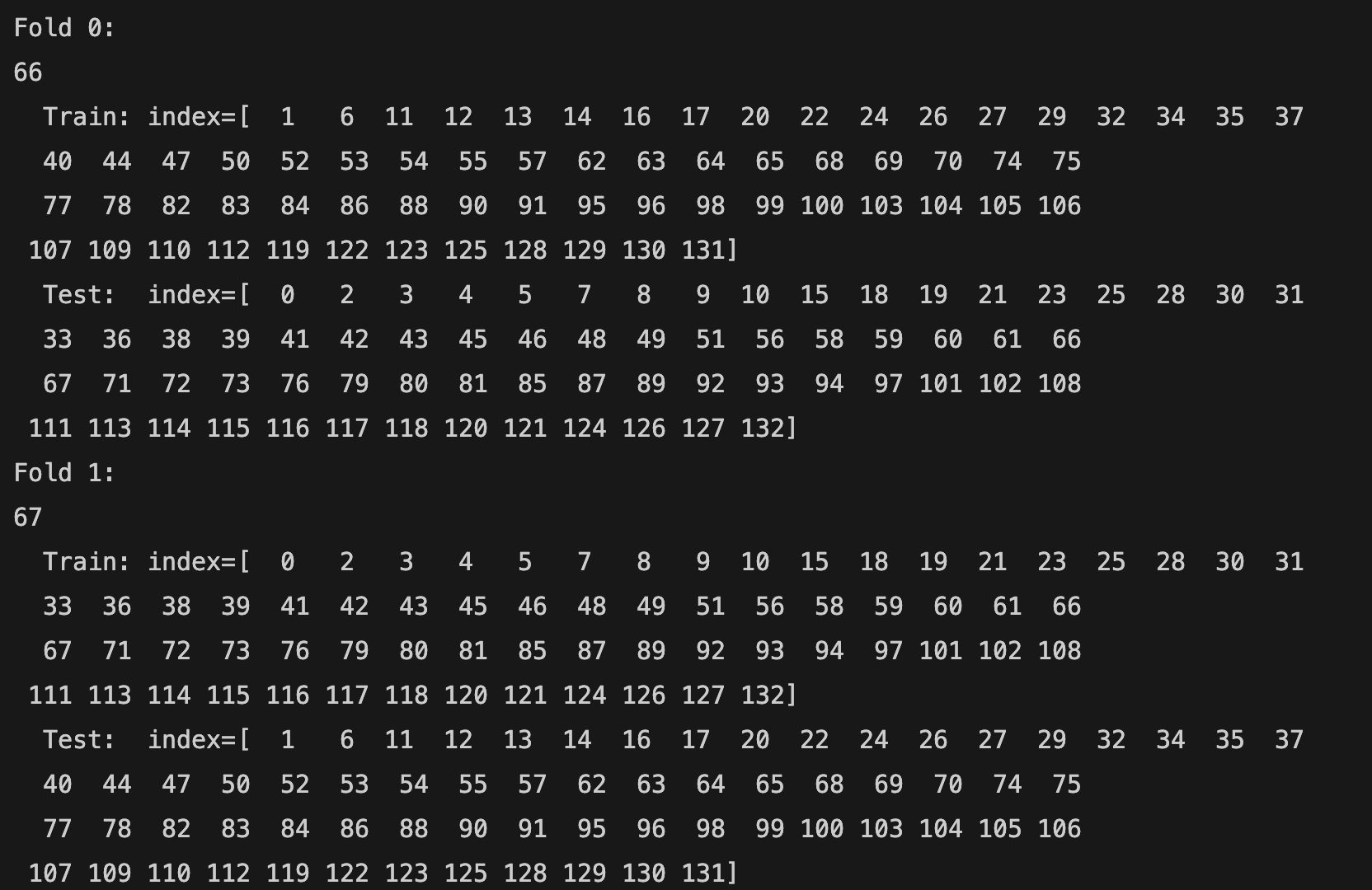
The total number of training samples is 133 (66 + 67). The first row shows the fold number (Fold 0, Fold 1). The n_splits parameter is 2. Therefore, there are 2 folds. The second row shows the total number of samples (66 for the first fold and 67 for the second fold) in a fold. The third row shows the index of training samples (Train: index= [...]), and the fourth row shows the index of test samples (Test: index= [...]).
Stacking Regressor (StackingRegressor)
StackingRegressor uses the results of different regressor models to compute the final prediction. The syntax of the StackingRegressor is similar to the StackingClassifier but different from the previous models. You should specify base estimators using the estimators parameter. We used RandomForestRegressor and LinearRegression models. You should also choose a final estimator that will be used to combine the base estimators using the final_estimator parameter. The final_estimator is RandomForestRegressor in the example below. The default value is RidgeCV.
Stacking Regressor Example
from sklearn.datasets import fetch_california_housing
from sklearn.ensemble import RandomForestRegressor
from sklearn.ensemble import StackingRegressor
from sklearn.linear_model import LinearRegression
from sklearn.model_selection import train_test_split
X,y = fetch_california_housing(return_X_y=True, as_frame=True)
housing = fetch_california_housing()
estimators = [
('rfr', RandomForestRegressor()),
('lr', LinearRegression())
]
reg = StackingRegressor(
estimators=estimators,
final_estimator = RandomForestRegressor(n_estimators=10))
X_train, X_test, y_train, y_test = train_test_split(
X, y, random_state=42)
reg.fit(X_train, y_train)
print(reg.score(X_test, y_test))
The score is around 0.75. StackingRegressor has a high performance. On the other hand, it has a slow performance. The cv parameter determines the cross-validation splitting strategy used in cross_val_predict to train the final_estimator. Possible inputs for cv are: int, cross-validation generator, iterable, "prefit", and (default=) None. For integer/None inputs, if the estimator is not a classifier, you should use KFold. KFold provides train/test indices to split data into train/test sets and splits the dataset into k consecutive folds (without shuffling by default).
from sklearn.model_selection import KFold
kfold = KFold(n_splits=2)
reg = StackingRegressor(
estimators=estimators,
final_estimator = RandomForestRegressor(n_estimators=10 ), cv=kfold
)
You can see how KFold splits the data:
for i, (train_index, test_index) in enumerate(kfold.split(X_train, y_train)):
print(f"Fold {i}:")
print(len(train_index))
print(f" Train: index={train_index}")
print(f" Test: index={test_index}")

The total number of samples is 15480. The first row shows the fold number (Fold 0 and Fold 1). The second row shows the total number (7740 for each) of samples in a fold. The third row shows the index of training samples (Train: index= [...]), and the fourth row shows the index of test samples (Test: index= [...]).
Voting Classifier
The VotingClassifier is a simple but powerful ensemble method that combines the predictions of multiple models to make a final decision. Instead of relying on a single algorithm, it lets several models “vote” on the output. There are two main types of voting: hard voting, where the class with the most votes wins, and soft voting, where the predicted probabilities of each class are averaged and the class with the highest probability is chosen. In hard voting, each model simply votes for its predicted class, and the class with the majority of votes becomes the final prediction. This approach works well when the individual models are similarly accurate and produce discrete class labels. In soft voting, each model predicts probabilities for each class, and the class with the highest average probability across all models is chosen. Soft voting often gives better results because it takes into account each model's confidence in its predictions, making the ensemble more robust and accurate. VotingClassifier is especially useful when different models make complementary errors — by combining them, you can often achieve more stable and accurate predictions than any single model alone.
from sklearn.datasets import load_wine
from sklearn.model_selection import train_test_split
from sklearn.preprocessing import StandardScaler
from sklearn.linear_model import LogisticRegression
from sklearn.ensemble import RandomForestClassifier, VotingClassifier
from sklearn.metrics import accuracy_score
#Load dataset
X, y = load_wine(return_X_y=True)
#Train-test split
x_train, x_test, y_train, y_test = train_test_split(
X, y, test_size=0.25, random_state=42
)
#Scale numeric features
scaler = StandardScaler()
x_train_scaled = scaler.fit_transform(x_train)
x_test_scaled = scaler.transform(x_test)
#Define VotingClassifier (soft voting)
voting = VotingClassifier(
estimators=[
("lr", LogisticRegression(max_iter=1000)),
("rf", RandomForestClassifier(n_estimators=100, random_state=42))
],
voting='soft'
)
#Train
voting.fit(x_train_scaled, y_train)
#Predict and evaluate
pred = voting.predict(x_test_scaled)
print("Test accuracy:", accuracy_score(y_test, pred))
Important requirement: For soft voting, every model in the ensemble must provide predicted probabilities (i.e., implement predict_proba). Models that only output class labels cannot be used for soft voting unless they are modified to provide probabilities.
Ensemble models like Random Forest, Gradient Boosting, and VotingClassifier can all be integrated into Scikit-learn pipelines, allowing you to combine preprocessing and modeling in a single, streamlined workflow—see our scikit-learn pipeline guide for practical examples.
To learn more about scikit-learn concepts, installation, and core machine learning algorithms, visit our complete scikit-learn tutorial.