
React Native Reanimated 4.1.1 Library
React Native Reanimated 4.1.1 is a high-performance animation library for building smooth, interactive animations in React Native applications. It enables developers to create advanced UI animations such as drag-and-drop interactions, bottom sheets, scroll-based effects, and gesture-driven transitions—all running efficiently on the UI thread.
With powerful features like shared values, automatic worklets, gesture handling, and layout animations, React Native Reanimated 4.1.1 helps deliver fluid animations that feel fast and responsive, even during complex user interactions.
In standard React Native animations, animation updates often depend on JavaScript thread execution, which can lead to frame drops or lag when the JS thread is busy. React Native Reanimated solves this problem by moving animation logic closer to the native rendering layer, significantly improving performance.
This architecture makes Reanimated an ideal choice for gesture-based UI animations, especially when used together with React Native Gesture Handler, which provides native-driven gesture recognition for smooth, high-performance interactions. By offloading animation calculations to the UI thread, Reanimated ensures smooth and consistent animations across devices.
Worklets
Worklets are a core concept in React Native Reanimated. A worklet is a special function that runs directly on the UI thread, allowing animations and gestures to update smoothly at 60 fps without relying on the JavaScript thread.
Worklets can access only shared values and worklet-safe data, not regular JavaScript state. When communication with the JavaScript thread is required—for example, to update React state—you can use runOnJS. Worklets are essential for building high-performance animations in modern React Native apps.
Shared Values in React Native Reanimated
Shared values are the core state mechanism in React Native Reanimated. They store animation-related data directly on the UI thread, allowing animations and gestures to update visual properties without triggering React renders or communication with the JavaScript thread.
In gesture-driven animations, shared values are updated continuously as the user interacts with the screen. Any animated styles or animations that depend on these shared values respond instantly, resulting in smooth, high-performance React Native animations.
Shared values are designed specifically for animations and UI interactions. Application state, logic, and side effects should remain in React state or external state management, while shared values focus exclusively on animation performance and responsiveness.
Animated Styles and Animated Props in Reanimated
Animated styles and animated props define how shared values affect the UI in React Native Reanimated. Instead of recalculating styles during React renders, animated styles are evaluated directly on the UI thread, enabling smooth and efficient UI updates.
An animated style derives visual properties such as transform, opacity, or position from shared values. When shared values change — for example during a gesture — animated styles update immediately without causing re-renders. This makes animated styles essential for gesture-based animations and interactive UI patterns.
Animated props work in the same way but apply to component properties rather than styles. Together, animated styles and animated props provide a declarative and high-performance way to connect gesture input to animated UI output in modern React Native applications.
React Native Reanimated Installation & Setup
You can check out the Expo tutorial to learn how to set up an Expo project from scratch.
If you are using npm, run the command below for the library:
npm install react-native-reanimated
You should also install worklets:
npm install react-native-worklets
You will need react-native-svg library for the example below. If you want to install react-native-svg library, you can use the command below:
npm install react-native-svg
Setup Differences Between Bare React Native and Expo for React Native Reanimated
The setup process for React Native Reanimated differs depending on whether you are using bare React Native or Expo.
In bare React Native, Reanimated requires several manual configuration steps. You need to install the library, add the Reanimated Babel plugin, ensure proper Metro configuration, and run native builds for iOS and Android. Missing any of these steps can cause runtime or build-time errors.
In contrast, Expo simplifies the setup significantly. When using Expo (especially with Expo Go or a managed workflow), most native configuration is handled automatically. You typically only need to install react-native-reanimated and add the Babel plugin, without worrying about native code changes.
React Native Reanimated Setup for bare React Native
To get started with bare React Native, you can follow the React Native tutorial to see how to set up your project step by step.
After installing necessary packages, add the plugin to your babel.config.js:
module.exports = {
presets: ['module:@react-native/babel-preset'],
plugins: ['react-native-worklets/plugin'],
};
Clear Metro bundler cache:
npm start -- --reset-cache
While developing for iOS, make sure to install pods first before running the app:
cd ios && pod install && cd ..
react-native-reanimated examples
React Native Reanimated can be challenging to understand at first. To make things easier, we'll start with simple, step-by-step examples:
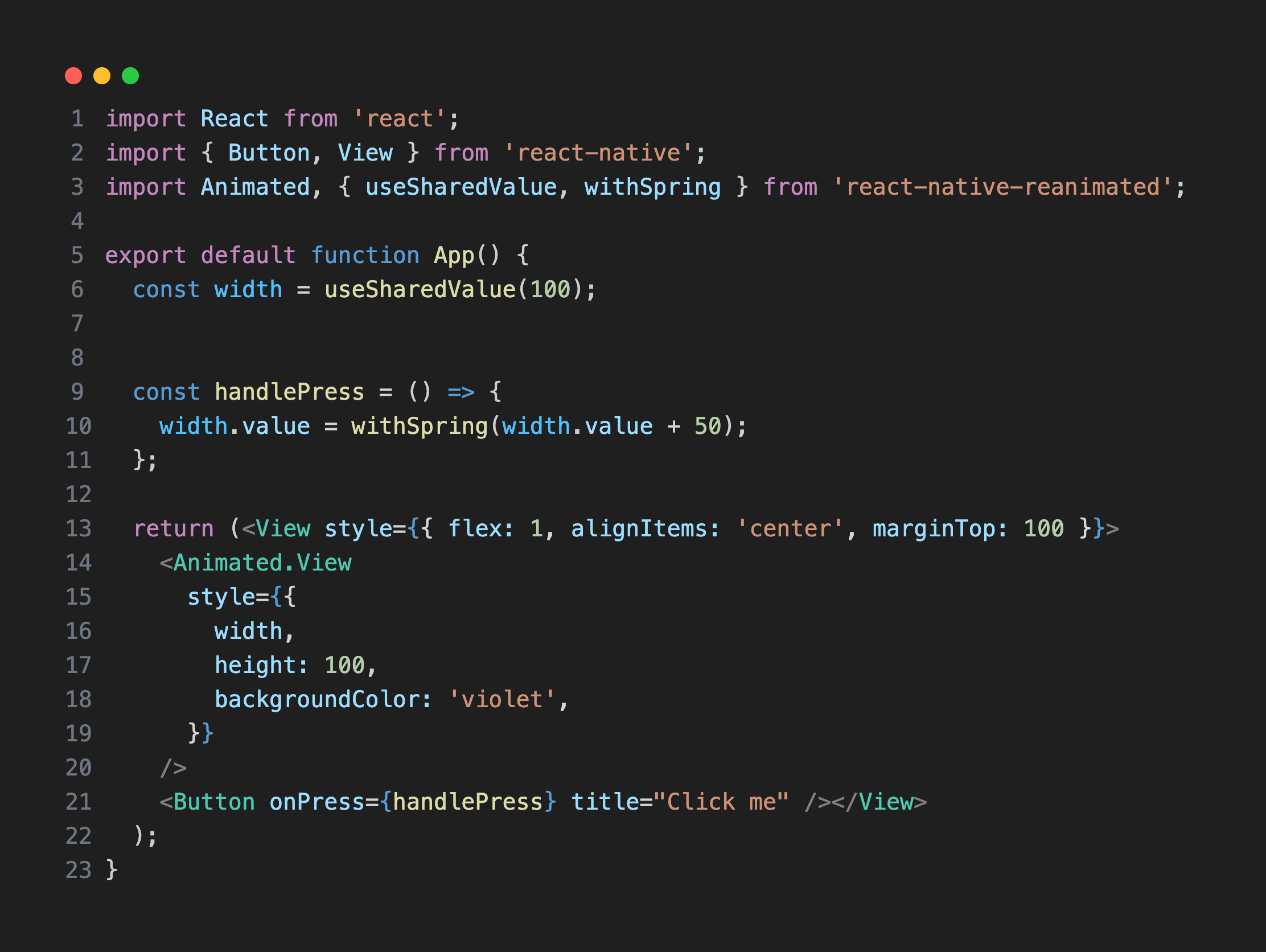
When the user clicks the box, it grows in size. useSharedValue is used to define shared values inside your component.
useSharedValue
useSharedValue in React Native Reanimated is a hook for storing mutable, animation-driven state that lives on the UI thread, while useState stores React state on the JavaScript thread and triggers component re-renders.
A shared value exposes a .value property that can be read and updated by worklets—such as useAnimatedStyle, useAnimatedProps, gesture handlers, and reactions—without causing a React render. This allows animations to run smoothly at 60 FPS, even when the JavaScript thread is under heavy load.
In contrast, useState is designed for application logic and UI structure. Updating it schedules a React re-render and propagates changes through the component tree, which makes it unsuitable for per-frame animation updates.
You can think of useSharedValue as “state for motion”—fast, mutable, and render-free—while useState is “state for UI logic”, declarative and render-driven. In practice, they often work together: useState determines what should be shown, while useSharedValue controls how it moves or animates.
withSpring
withSpring is a React Native Reanimated animation function that moves a shared value toward a target using spring physics, creating natural and bouncy motion. Instead of updating the value instantly, it animates the shared value over time on the UI thread, without triggering React re-renders.
Compared to fixed-duration animations like withTiming, withSpring feels more responsive because it reacts to velocity and overshoot, which makes it especially well suited for gestures and interactive animations.
Now that we've learned about useSharedValue and withSpring, let's look at another example:
useSharedValue and withSpring example
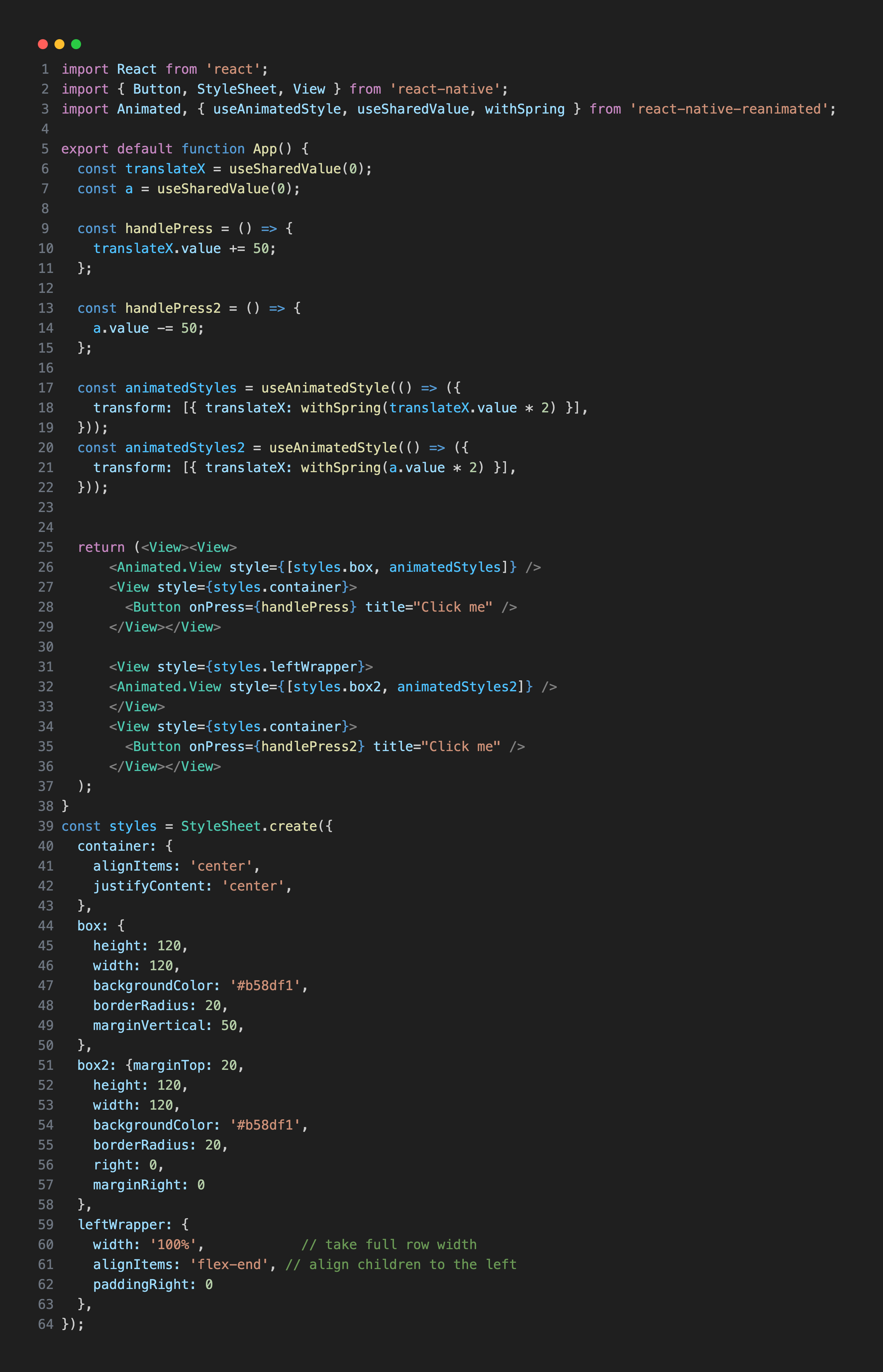
In this example, one box animates from left to right, while the other moves in the opposite direction, from right to left.
useAnimatedStyle
useAnimatedStyle is a React Native Reanimated hook used to animate style properties of a component—such as opacity, transform, or backgroundColor—using shared values. It returns a style object that is automatically updated on the UI thread whenever the shared values it depends on change, without triggering React re-renders. Unlike regular styles or useState-driven updates, useAnimatedStyle enables smooth, frame-perfect animations by bypassing the JavaScript render cycle, making it ideal for visual and layout-related animations. The example above shows how to apply useAnimatedStyle to animate a component's style using shared values.
In the previous example, we used useAnimatedStyle to animate style properties like transform and opacity directly on a component. This works well for standard React Native style attributes, allowing smooth animations that run entirely on the UI thread without triggering React re-renders.
However, some components—especially those from third-party libraries like react-native-svg—do not support standard style properties. For instance, you can't animate the cx, cy, or strokeWidth of an SVG element using useAnimatedStyle because they aren't part of the React Native style system.
This is where useAnimatedProps comes in. useAnimatedProps allows you to animate props of a component, not just styles. It works similarly to useAnimatedStyle by reading shared values and updating the component directly on the UI thread, but it can target any prop, including SVG-specific attributes like fill, stroke, or path data.
The example below demonstrates how to use useAnimatedProps:
useAnimatedProps example
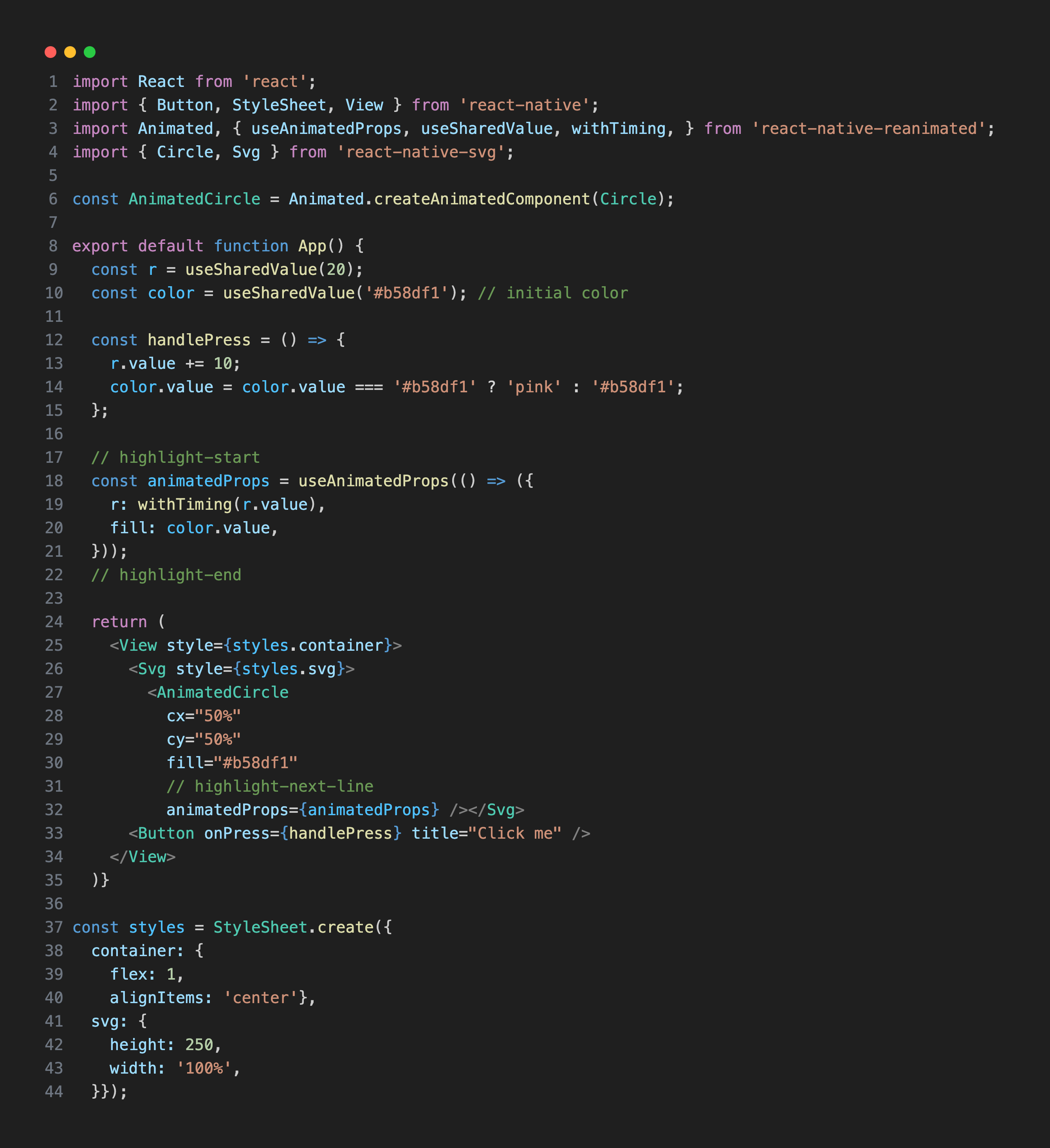
We used svg library that we earlier installed. react-native-svg provides support to React Native on iOS, Android, macOS, Windows, and a compatibility layer for the web. SVG is used for the circle in the example. cx and cy are used for the dimensions and fill is used for the color to paint inside of the circle. In the example above, when the user taps the circle, its color changes and its size increases by 50%.
useAnimatedProps
In React Native Reanimated, useAnimatedProps is a hook used to animate component props that are not part of the style object, allowing updates to run smoothly on the UI thread without triggering React re-renders.
Unlike useAnimatedStyle, which targets visual styles, useAnimatedProps directly updates native component properties, making it ideal for high-performance animations involving non-style attributes.
This hook is especially useful when working with third-party native components or complex visuals where style-based animation is not possible.
Now that we've seen how useAnimatedProps works, let's look at an example using useAnimatedScrollHandler:
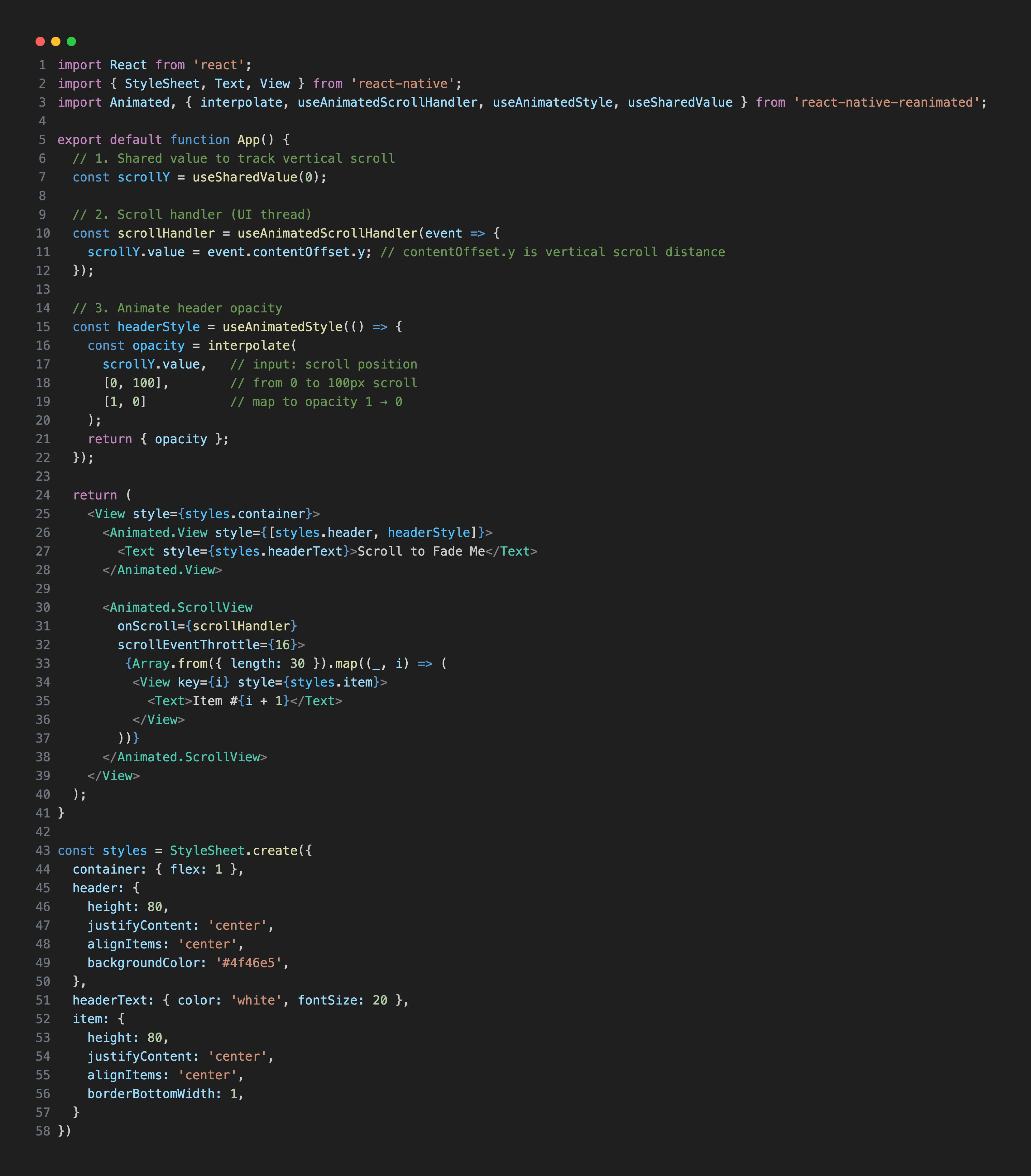
In this example, focus on the “Scroll to Fade Me” component. When you scroll down, it gradually fades away. contentOffset.y shows how far the scrollable content has moved from its original position. scrollY is a useSharedValue that updates based on event.contentOffset.y as the user scrolls.
useAnimatedScrollHandler
useAnimatedScrollHandler is a React Native Reanimated hook that returns a scroll event handler. You can attach it to scrollable components like ScrollView or FlatList to track scroll events and update shared values in real time.
Interpolate
The interpolate function maps a value from one range into another. The syntax is interpolate(input, inputRange, outputRange). For example, when a user scrolls from 0 to 100 pixels, you can interpolate the scroll position to change the opacity of a component from 1 to 0.
Real World Reanimated Examples
Accordion
An accordion shows and hides content and can be used for menus, FAQs, or collapsible sections. In our tutorial, we will create a menu using an accordion to demonstrate how Reanimated can manage dynamic, interactive UI elements smoothly.
React Native Reanimated Accordion Example
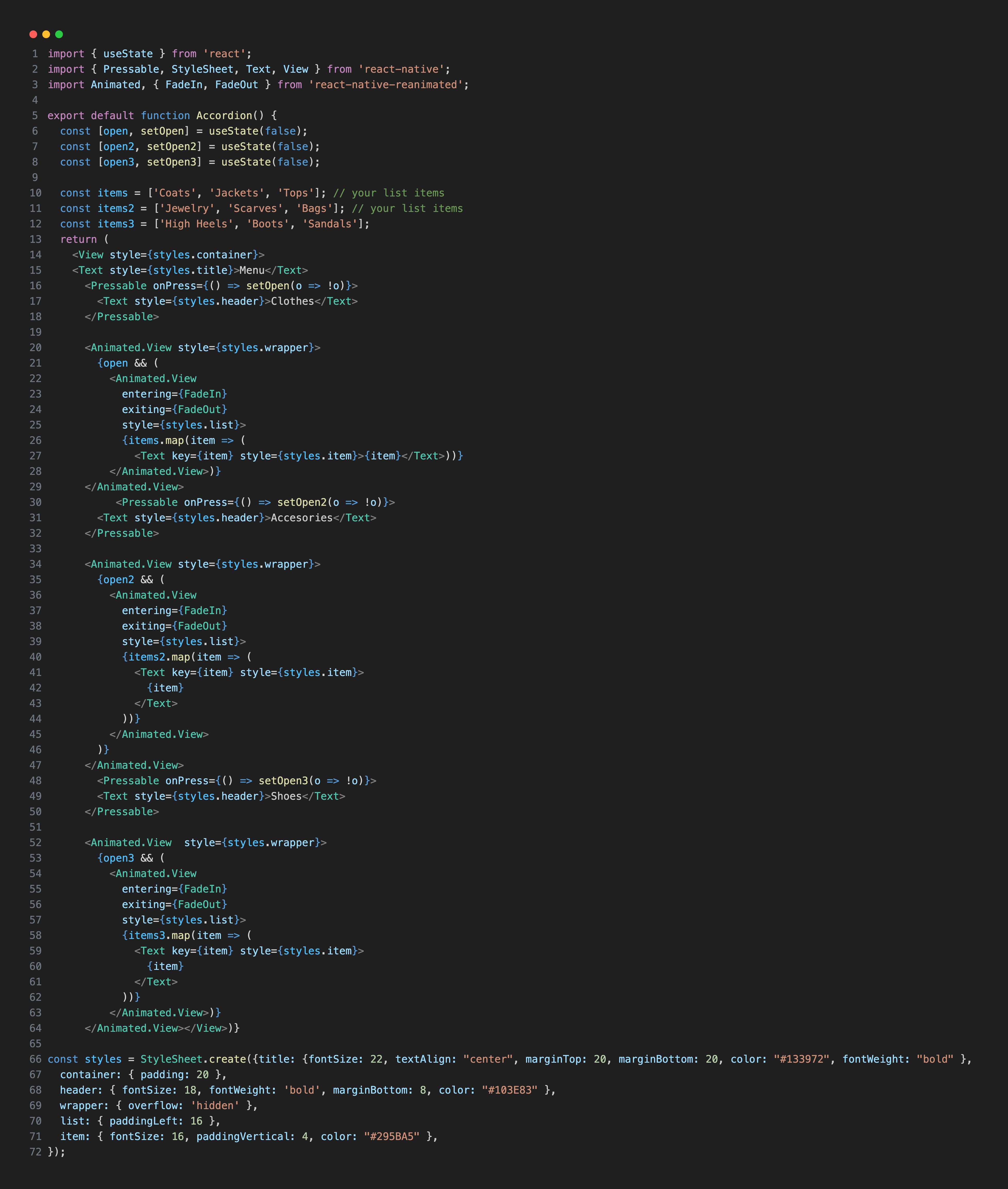
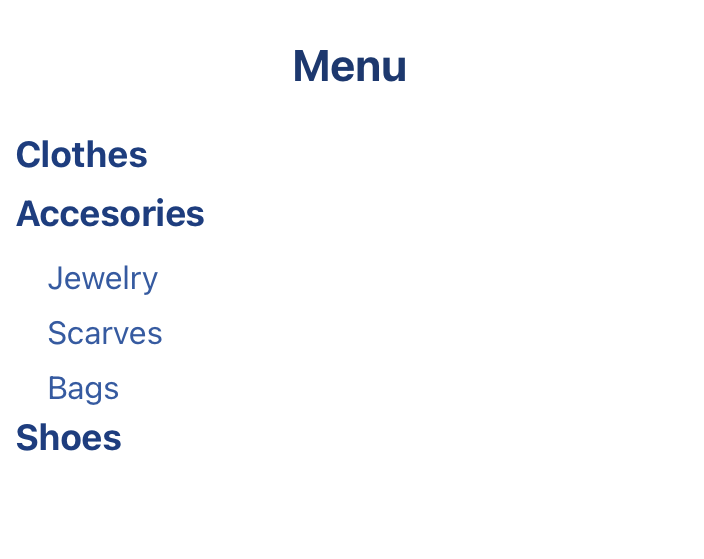
Accordion is used to display options in the menu in the example above. When you click Clothes, Accessories, or Shoes section, the options are displayed under the title.
With React Native Reanimated, the accordion's open and close behavior can be animated smoothly using shared values and animated styles. Instead of instantly showing or hiding content, Reanimated animates properties like height, opacity, or rotation directly on the UI thread, ensuring high-performance, frame-perfect animations.
Bottom Sheet
Bottom sheets are surfaces that contain supplementary content and slide up from the bottom of the screen. They are often used to display menus, forms, or additional options without navigating away from the current view.
React Native Reanimated Bottom Sheet Example
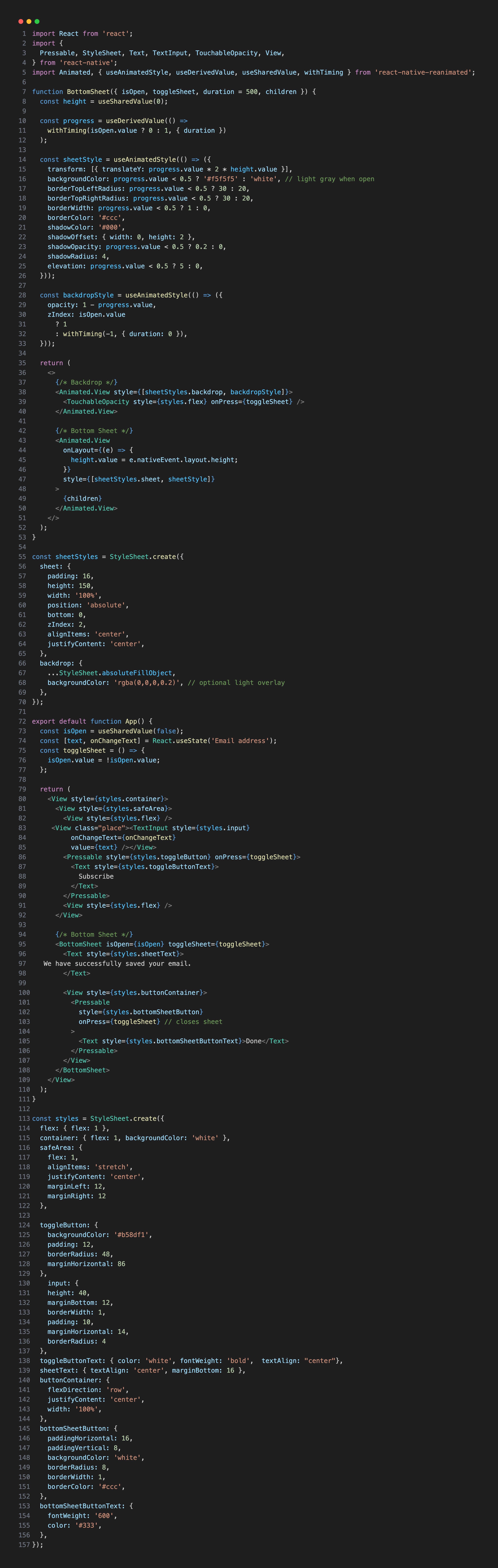
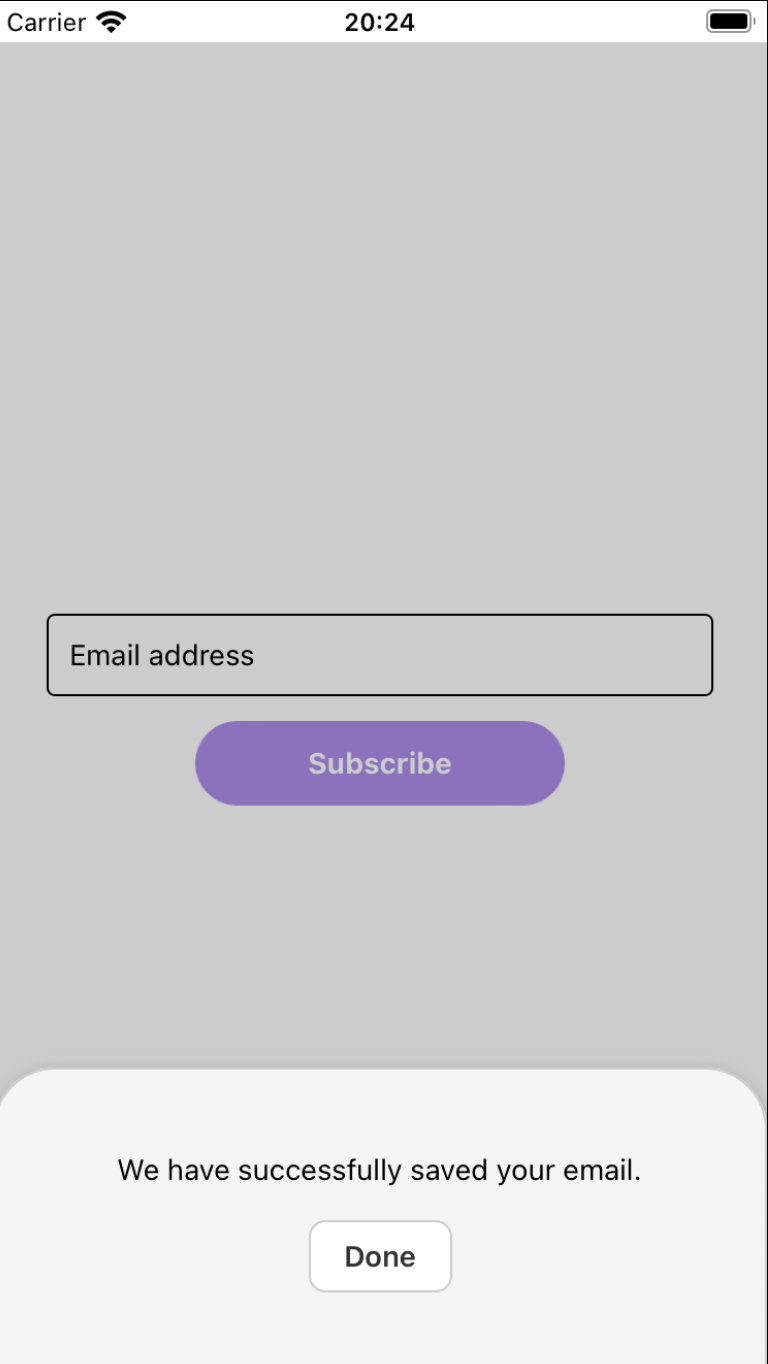
The bottom sheet is the white or light gray box you see at the bottom of the screen in the example above. The backdrop refers to the semi-transparent layer behind the bottom sheet.
When using React Native Reanimated, the bottom sheet's movement is driven by animations that run entirely on the UI thread. This ensures that gestures—like dragging the sheet up or down—feel smooth and responsive, even under heavy JavaScript load.